A logo can look perfect in an approval presentation and still arrive in a form that is difficult to use. A website developer may receive only a small JPG. A printer may ask for vector paths, while nobody knows which file contains them. These problems usually begin at handover, when visual approval is treated as proof that the files are production-ready.
Understanding logo file formats helps a brand check what it has actually received before closing the project. The useful question is not how many files are in the folder, but whether the package supports the next real tasks: publishing the mark online, placing it in everyday documents, producing physical materials, and preserving editable artwork for future revisions.
Define the Delivery Before Choosing Extensions
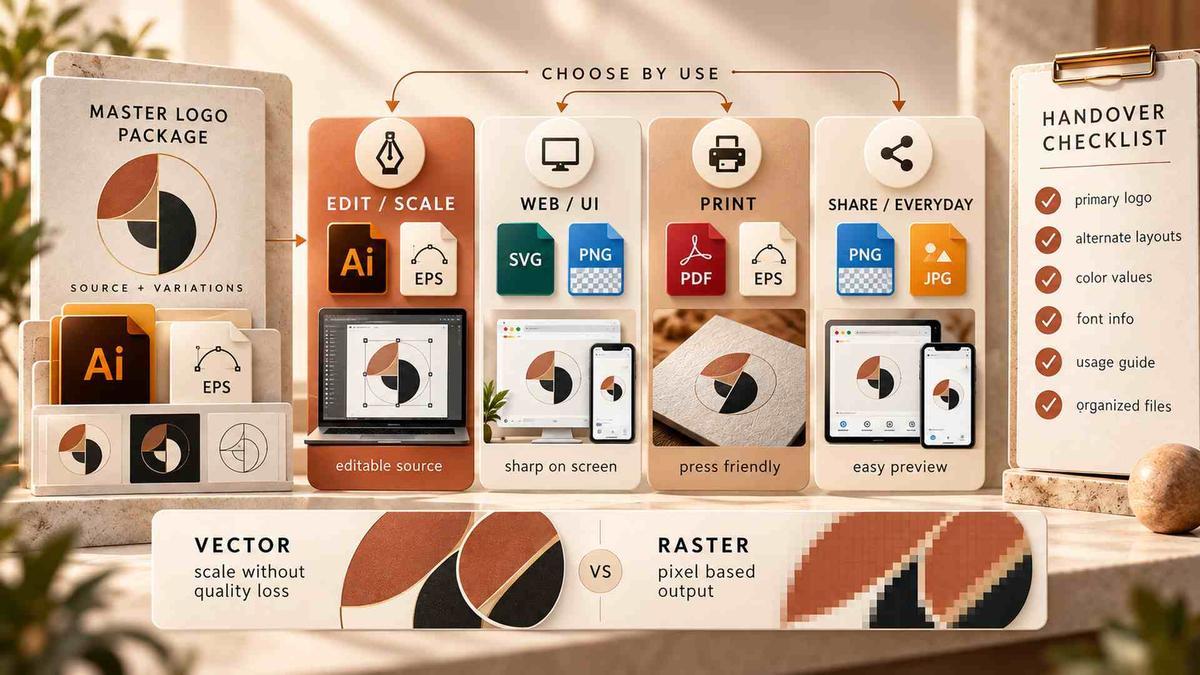
Start with the uses the brand must support, then define the files around those uses. A practical handover often includes an editable master, an SVG for supported web workflows, transparent PNGs for everyday placement, a vector PDF for relevant supplier workflows, and a short usage guide. The approved variants should also be identified within the project scope.
The right logo file formats depend on the receiving team, its software, and the destinations agreed before delivery. Choosing extensions first can create a large folder without solving the actual handover problem.
Separate Scalable Artwork From Editable Text
Genuine vector logo files describe paths mathematically, so those paths can scale without the pixelation caused by enlarging a bitmap. But a vector document can still contain embedded raster images or effects whose quality depends on resolution. An AI or PDF extension alone does not prove that the artwork is fully vector.
Outlining lettering converts text into editable paths; it does not lock those shapes. What is lost is ordinary text editing. An outlined production copy can reduce font dependencies, while a separate master with live text may support future revisions when that file is included in scope. Record the application and version needed to edit the master. AI commonly serves Illustrator workflows, while SVG can itself be the working source in another workflow.
What Makes an Export Production-Ready?
A production-ready export has to preserve the approved appearance in the environment where it will be used. For a website, inspect the SVG's viewBox, proportions, empty margins, and external dependencies. For print, ask the supplier which PDF settings, color specifications, and artwork construction it requires. A logo PDF may be an input to production without being a complete print-ready job.
The broader Digital Design & Branding workflow connects the identity with the places it will appear. At handover, turn those applications into acceptance criteria: who will open each file, what they will do with it, and which settings or dependencies they need. Resolve those requirements while the designer can still correct the source rather than asking recipients to repair exports independently.
Choose Logo File Formats by Destination
Websites, presentations, print suppliers, and embroidered uniforms do not ask the same thing from a logo file. The handover package should identify which files are ready for ordinary use and which require a production specialist. Avoid a folder full of nearly identical exports without instructions; extra files cannot compensate for a missing approved variant or an inaccessible master.

SVG, PDF, AI, and EPS Are Not Interchangeable
SVG is useful for scalable web graphics, but it can contain text, raster images, styling, or external references. A vector PDF is often convenient for exchanging artwork with printers. AI can retain Illustrator editing features, while EPS may still be required by a particular legacy workflow. Request EPS when a recipient actually needs it. For vector logo files, inspect the path content and compatibility instead of treating an extension as proof of production readiness.
PNG and JPG Serve Different Everyday Needs
PNG supports transparency and works well for documents, presentations, and upload portals that require raster images. JPG does not preserve transparency, and compression can leave artifacts around sharp edges. A JPG can still be useful for a requested fixed-background use, but it should not be the only deliverable when the brand also needs transparent placement, scalable artwork, or future editing.
For SVG vs PNG logos, start with the destination. A supported SVG may scale cleanly across a website, while an upload form may require PNG. That choice is about delivery, not ownership of the source. A web-optimized SVG may omit editing information retained in the master, while an SVG used as the working document may preserve what that workflow needs.

Build Variants Around Real Use Cases
Approved variants should respond to real constraints: light and dark backgrounds, narrow spaces, small displays, or one-color production. List the required variants before exporting them into multiple formats. Otherwise, a team can receive dozens of files and still lack a usable white logo for a dark slide.
Additional configurations should be treated as design decisions, not improvised later by whoever encounters the problem.
Color, Orientation, and Background Versions
Include the primary arrangement and any approved stacked, compact, or symbol-only versions. Small-size variants may also use approved optical adjustments. Each delivered vector file should match the approved master for that specific variant. Do not squeeze a horizontal wordmark into a square avatar or create a monochrome version through an untested automatic recolor.
The brand identity design guide provides the wider context for these usage rules. Document permitted backgrounds, minimum sizes, clear space, and restrictions. Keep variant names consistent across the guide and the files so the connection remains visible outside the design application.
Color Values Need a Defined Destination
Record RGB or hexadecimal specifications for digital use and the agreed CMYK or spot-color specifications for relevant print applications. State any required color profile or supplier conditions. A screen preview cannot establish a physical color match because paper, ink, material, and finishing affect the result.
For color-sensitive work, confirm the supplier's proofing process before production. Simply converting an RGB export to CMYK does not settle those production decisions.
Test SVG and PNG in the Actual Destination
The useful comparison of SVG vs PNG logos happens in the receiving application. Test the actual website, document template, email environment, or upload route. A file that opens in a browser may still be rejected or altered elsewhere.
Keep the approved source untouched while preparing copies for specific destinations, then compare those copies with the reference artwork after optimization or conversion.
Check Dimensions and Appearance in Context
For PNG, inspect transparent edges on both light and dark backgrounds. If a platform requests a specific pixel width, export that size from suitable source artwork and test it. Changing PPI metadata does not add pixels. Check the visible mark as well as the canvas dimensions, because excessive transparent margins can make a nominally large file appear small.
For both SVG and PNG, look for missing lettering, clipped strokes, altered spacing, or unexpected backgrounds. Scaling a screenshot into a larger PNG cannot restore vector detail. For SVG, have the responsible designer or developer inspect dependencies and test any cleanup before release. Record failures with the filename, destination, and a screenshot so the correction can be reproduced and checked.
Use a Short Logo Handover Checklist
A logo handover checklist should connect the approved artwork to evidence that recipients can actually use it. Assign the review to a named person and test a representative output from each required use, including dark-background and monochrome variants where those versions are part of the package.
- Open the agreed master and verify its paths, text, linked resources, and editing requirements.
- Test released web, document, and print outputs against their approved variants and intended destinations.
- Confirm that the usage guide, permissions, release identity, and recipient access accompany the files.
Keep Files Findable and Dependencies Visible
Use short names that distinguish the brand, variant, color treatment, and release. Keep sources, released exports, and supporting instructions in clearly identified locations. The article on design file naming and version control explains the revision system in more detail. For logo handover, the essential check is that each delivered output points to the correct approved source and that obsolete alternatives cannot be mistaken for current assets.
Access also needs testing. Confirm that the brand retains an agreed copy beyond the designer's shared folder. Document font names and licensing requirements without assuming font files can be transferred. Where live-text editing requires a separate license, identify that dependency. Receiving an outlined logo does not automatically provide a license to install its original typeface.
Separate Delivery Defects From New Requests
Ask the recipient to complete an ordinary task without verbal help, such as placing the white mark on a dark slide. If an agreed file is missing, damaged, inaccessible, or inconsistent with its approved reference, request a correction before accepting that part of the delivery.
A newly requested symbol, layout, or variant is different: record it as a scope question. The handover should distinguish incomplete delivery from additional design work so both the brand and the studio know what remains to be resolved.
Conclusion
Approve logo file formats against the uses the project agreed to support, not against the size of the archive. Close the handover when required outputs work in their intended destinations, editable artwork is available as agreed, and dependencies are documented.
If a supplier requirement remains unresolved, identify the affected use and who will resolve it before production. Keep that item explicit rather than treating visual approval as permission to manufacture. A completed handover should leave the brand with usable assets and a clear record of any remaining limits.
Frequently Asked Questions
Which logo files should a brand receive?
Agree on an editable master, appropriate vector exports, transparent PNGs, approved variants, and usage instructions. The exact package should reflect the destinations and workflows agreed for the project.
Is an SVG always an editable source?
No. SVG can serve as a source or an export. Inspect its contents and confirm that it is compatible with the workflow that needs to open or edit it.
Does outlining text make it uneditable?
No. Outlined letters remain editable paths, but ordinary text editing is lost. Preserve a live-text master separately when that capability is part of the agreed handover.
How should you approve a logo handover?
Test the required files in their intended applications. Verify the approved artwork, permissions, dependencies, and access before accepting delivery. A filename alone does not prove suitability or approval.