
A designer corrects a logo after approval and exports a fresh PDF. A colleague later sends the older PDF because both files say "final." Nothing is missing, but the team can no longer connect the delivered artwork to the revision the client actually reviewed.
The problem starts before anyone presses Export. The source file, review decision, and delivery copy have stopped pointing to the same work.
Good design file naming reduces that ambiguity. The goal is not to create the longest possible filename. It is to give designers, studio leads, and production partners enough information to identify an asset, recover its approved source, and understand what a delivered file is for. The system below follows one hypothetical logo through review, release, and correction, while remaining flexible enough for other creative disciplines.
Give Each Asset a Stable Identity
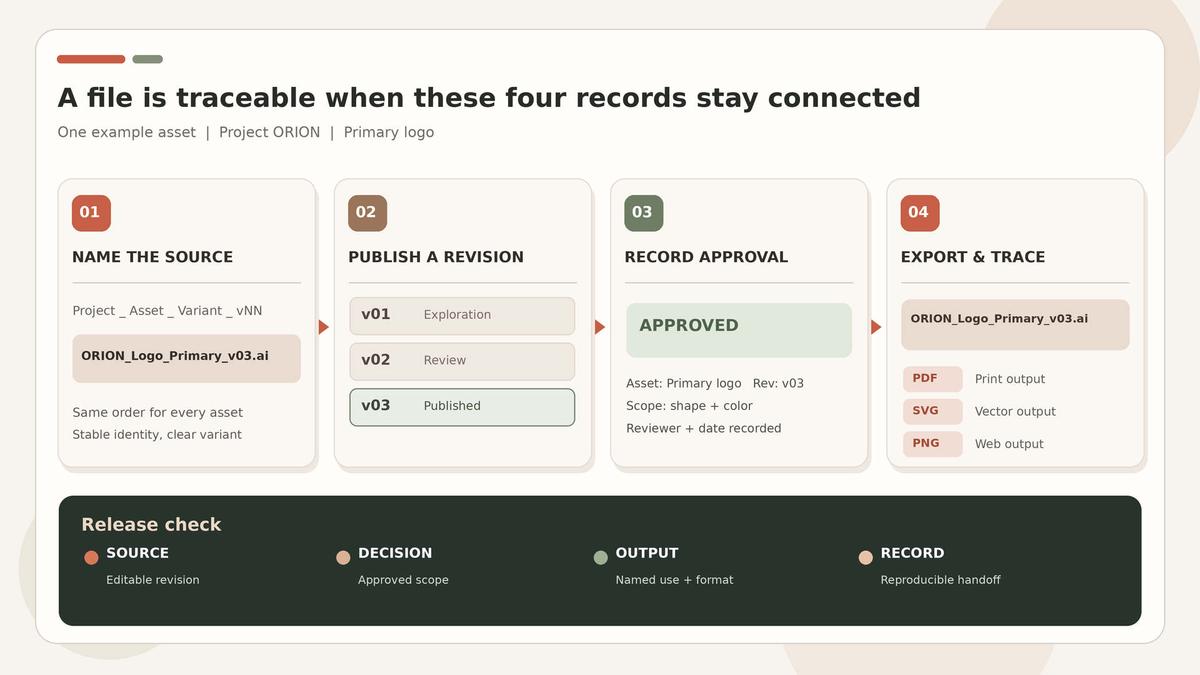
Start with a compact, repeatable structure such as Project_Asset_Variant_vNN.ext. For example, ORION_Logo_Primary_v03.ai identifies the project, the primary logo, and its third published working revision. ORION_Logo_Mono_v03.ai is a separate variant, not another name for the same file.
Consistency matters more than complexity. When the same fields appear in the same order, related assets sort together and teammates can scan them quickly without decoding a different naming logic every time.
Add Only Descriptors That Affect the Next Task
Useful identifiers depend on the production context. A garment pattern might use ORION_Jacket_Sleeve_SizeM_v03.dxf to distinguish piece and size. A game asset might use ORION_Crate_Mesh_LOD1_v03.fbx to identify a mesh and level-of-detail variant. These are examples, not universal rules; the receiving workflow may require different fields.
Avoid forcing every specification into the filename. Detailed dimensions, color values, licensing conditions, review comments, and export settings are easier to maintain in supporting documentation. A short naming guide should define unfamiliar tokens and show which fields are required for each discipline.
Use Dates for Events, Not Revision Order
A revision number tells you where an asset sits in its development history. A date tells you when an event happened. Keep v03 for the source revision and use a clear date for a delivery package, such as ORION_Delivery_20261011. Define whether that date means export or delivery, and do not overwrite an earlier release simply because another package leaves the studio on the same day.
Separate Revision History From Approval
Numbered filenames are only one part of design version control. Native application history preserves recoverable states. A review record captures a decision. A release identifies what actually leaves the team. Those are related, but they are not interchangeable.
A file called v03 may still be unapproved. An approved PDF may exist without a recoverable editable source. Renaming either file does not repair that gap.
Publish Revisions at Meaningful Checkpoints
Increase the revision when a change needs to remain reviewable or recoverable: a revised composition, an accepted direction, or a source that downstream work will depend on. Routine saves can stay inside the application's native history.
Before ORION_Logo_Primary_v03.ai is published for review, preserve the dependencies that make it reproducible and identify the checkpoint that produced the review PDF. Later edits belong to another checkpoint rather than silently changing the file that was already reviewed.
For design version control to stay reliable, one person or role should own the publication of shared review and release versions. If two contributors revise v03 independently, preserve their working copies until the changes are deliberately reconciled and published as the next shared revision.
Record Exactly What Approval Covers
Suppose the client accepts the logo shape but asks for a color adjustment. Calling the whole v03 file "approved" hides an open decision. The approval record should identify the asset, exact revision, reviewer, date, scope, and any unresolved conditions.
A clear design version tracking record might read: "Primary logo v03; brand lead; 2026-10-11; shape accepted; color unresolved; not released." After the color changes, the next decision should reference the new revision.
This is also where clear design feedback matters. How to Give Design Feedback helps separate accepted choices from requested changes, while the file reference removes any doubt about which artwork the reviewer saw.


Connect the Review Copy to Its Source
Export is a checkpoint worth recording explicitly. Create ORION_Logo_Primary_v03_Review.pdf from the preserved v03 source, then associate that exact PDF with the review record. The word Review describes purpose; it does not mean approved, released, or suitable for production.
When v04 receives full approval, generate the delivery outputs from the preserved v04 source. ORION_Logo_Primary_v04_Print.pdf and ORION_Logo_Primary_v04_Web.svg share a revision but serve different uses. The purpose label helps retrieval, while the export settings and file contents determine whether each output is actually suitable for its destination.

Document Dependencies When the Filename Isn’t Enough
A simple logo may have one source file. A campaign layout can depend on linked photography, illustrations, fonts, and export presets. Do not force all of that into the filename. Use a short manifest or delivery note that connects outputs to source revisions, dependencies, approval records, and essential export settings.
The test is simple: could another person reconstruct the release without relying on the original designer's memory? If not, the missing information belongs in the handoff record.
Keep the Convention Usable Across Tools
Creative file organization only works if the naming scheme survives the actual storage and export route. Use a restrained character set for shared identifiers, such as letters, numbers, and underscores. Avoid reserved characters such as slashes and colons, and test the full folder path rather than checking only the filename.
Keep the naming guide beside the working files and give one owner responsibility for updating it when requirements change. Use consistent capitalization and fixed-width revision numbers appropriate to the expected range. Do not rely on capitalization alone to distinguish assets.
Test the Transfer, Not Just the Naming Rule
Before adopting the convention across a project, send one representative package through the same storage, download, and import steps the team will actually use. That practical test catches problems that look harmless inside the design application but fail during handoff.
Review records also need a transfer plan. For example, an editable file may not carry comments, approval history, or every linked resource with it. Preserve the records that matter through an agreed accessible location rather than assuming the source file contains the whole project history.
Make the Delivery Package Easy to Inspect
Practical creative file organization separates editable sources, released outputs, dependencies, and documentation. Keep obsolete alternatives outside the current delivery area while preserving approved milestones that may need to be recovered later. Mark preview files clearly and identify any resources that cannot be transferred because of licensing or access restrictions.
This supports the usable handoff described in Aalix Studio's Digital Design & Branding work: understandable names help, but the recipient also needs the files and records required for the next task.
A useful handoff test is to ask a colleague who did not prepare the package to complete the recipient's next task without verbal hints. Use these checks:
- Locate the released primary logo and identify its intended output use.
- Recover the matching editable source and the decision that approved that revision.
- Find the previous reviewed revision and the settings needed to reproduce the release.
If the tester finds two apparently current outputs, the creative file organization needs attention. If the source opens but linked resources are missing, repair the dependencies. Those are different failures with different remedies; a longer filename will not solve both.
Handle Corrections Without Erasing the Release
A small change after delivery can recreate the same confusion that the word "final" caused in the first place. Preserve the released v04 package, make the correction in v05, and record the approval scope for that revision. Then publish a new delivery package that identifies which earlier outputs it replaces.
Notify the responsible recipient through the agreed project channel so the obsolete export is not reused in the next production task. Design version tracking should continue after initial approval, not stop when the first package leaves the studio.
That continuity also reflects the broader Creative Project Process, where decisions remain traceable through refinement, approval, and delivery.
Conclusion
Judge design file naming by the failure it prevents. If an output is hard to identify, improve the asset and purpose labels. If approval is unclear, repair the decision record and point it to the exact reviewed revision. If a release cannot be reproduced, recover the source, dependencies, and export settings.
A small system that the team actually follows is more useful than an elaborate convention nobody maintains. Stable identifiers, meaningful revisions, explicit approvals, and traceable delivery packages give design version control something filenames alone cannot provide: a reliable connection between the work that was created, the work that was approved, and the work that was delivered.
Frequently Asked Questions
What should a design filename include?
Use a project identifier, asset name, meaningful variant, and revision number. Add an output-purpose label when it helps distinguish review, print, web, or another delivery use.
Does the newest version mean approved?
No. A revision number shows development order, not approval status. Approval should reference the exact reviewed revision and state any unresolved conditions.
How should exports connect to source files?
Keep matching asset and revision identifiers across the source and its exports. Record dependencies and essential export settings separately so the release can be reproduced without overloading the filename.
What happens after a delivered design changes?
Preserve the earlier release, create a new revision, obtain the appropriate approval, and identify which outputs the replacement supersedes. Notify the recipient so obsolete files are not reused in the next production task.