
A redesign can give an outdated website a new appearance while carrying old problems into its new structure. Duplicate service pages remain confusing. Useful guides disappear because nobody checked who relied on them. Outdated claims survive because the copy looks finished. Before layouts are approved, a website content inventory should connect existing pages and assets with their audiences, owners, and proposed place in the new site.
Know What You Have Before Judging What Works
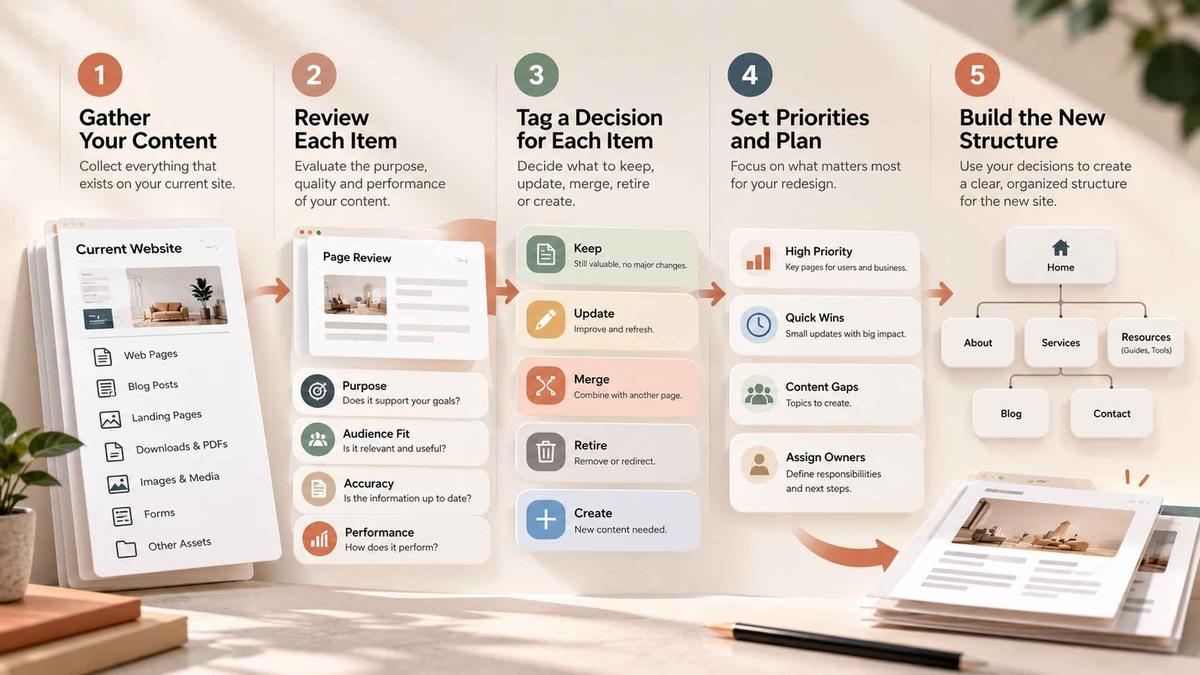
A website content inventory records existing pages and assets, their locations, formats, ownership, and dependencies. A website content audit evaluates whether that material is accurate, useful, accessible, and appropriate for the future site. Teams can record both in one document, provided observed facts remain distinguishable from recommendations and approved decisions.
A page with few visits may still answer a question asked just before purchase or support customers using an existing product. Record that purpose before judging performance. Otherwise, a redesign can remove necessary information simply because its value is not obvious in a traffic report.
Define the Boundary of the Review
Decide what counts as content before collecting URLs. Public pages are obvious, but downloadable guides, landing pages, embedded videos, reusable CMS entries, localized variants, and resource files may also need attention. A website content inventory that excludes these assets can leave teams discovering dependencies after templates and navigation have already been approved.
Build the initial list from a crawl, the XML sitemap, and a CMS export where available. Reconcile differences against analytics entry pages and linked downloads; one source may miss material found in another. Review every URL on a small site. For larger sites, record the full list and select priority pages and representative templates for closer assessment.
Record Enough Context to Make a Decision
For each item, capture the live URL, page purpose, intended audience, content type, owner, and last verified review date. Record related files and dependencies. Keep separate fields for the recommended action, approval status, and future destination so an unapproved suggestion cannot be mistaken for an instruction to migrate.
Use search queries, entry traffic, relevant enquiries, and customer support questions to assess demand. Low visits alone do not justify deletion, and high traffic does not excuse inaccurate content. Note the evidence behind each recommendation so the website content inventory supports decisions that another reviewer can inspect.
Judge Content Against Real User Tasks
A website content audit should examine what someone arriving with a specific need can understand and do. A fluent service description may still hide eligibility, prerequisites, or differences between options. Identify the question the page should answer, then check whether its content and next step actually help that reader.
Review priority customer journeys first. Follow the path from entry page to supporting explanation, comparison, proof, and next action. Gaps often sit between pages rather than inside them: one page introduces a service, but nothing explains who it is suitable for.
Test Accuracy, Relevance, and Responsibility
Have the subject owner verify statements that may have changed, including services, product names, eligibility, pricing references, process descriptions, and commitments. Mark claims requiring evidence or approval before migration so the redesign does not give outdated information a more credible visual wrapper.
Consider the reader's context as well. Is the language appropriate for a first time visitor? Are headings descriptive when read out of sequence? Do links explain their destinations? Can readers understand images or documents when they cannot see them? These concerns also inform Digital Design & Branding decisions.
Distinguish Weak Pages From Missing Content
A content inventory checklist should distinguish defects in existing pages from questions the site does not answer. Flag duplication, outdated assets, unclear next steps, and missing audiences. Before commissioning another page, establish whether the missing explanation belongs in existing content or serves a sufficiently different user task.
Suppose two service pages describe the same offer. One attracts relevant search visits; the other explains a prerequisite customers frequently miss. An approved merge should retain that explanation, serve both useful search intents, and provide a relevant destination for each old URL. If the pages address different eligibility rules or purchasing decisions, separate pages may serve readers better. This hypothetical example shows why similar wording alone is not enough to justify consolidation.
Decide What Happens to Every Important Page
A website content inventory should lead to an explicit recommendation for each reviewed item. Record whether to keep, revise, merge, or retire it, with a reason and an approver. Track missing content separately as proposed new work; it has no existing URL to migrate.
Specify what each recommendation requires. A revision may need subject expertise; a merge may need material from several owners. Before retiring a page, check its inbound links, useful information, and dependencies so the decision accounts for readers who still reach the old address.

Protect Useful Paths During Consolidation
Map merged pages to the most relevant surviving destination and update internal links. Avoid redirecting unrelated pages to the homepage. Where retired content has no suitable replacement, record that explicitly for the developer to implement an appropriate removal response. Check linked downloads separately; redirecting a page does not resolve every asset dependency.
The same principle applies to redesign content planning when navigation changes. Review landing pages, key internal links, and search intent together. The earlier article on website redesign versus refresh explains how to judge the depth of structural change; here the question is what each affected content item needs to survive that change.
Make the Decision Log Usable
Avoid a single cell labeled “update” with no explanation. A review record should communicate the proposed action and what must happen before release. For a high priority page, three short checkpoints are useful:
- Decision: keep, revise, merge, retire, or create, with a reason linked to user need.
- Responsibility: named reviewer, approver, and any subject expertise required for signoff.
- Migration: destination URL, linked assets, dependencies, and a test needed before launch.
Use the record during review to distinguish an approved action from a blocked one. Name the dependency preventing progress, such as missing source material or conflicting ownership. The project manager can then resolve the obstacle before it becomes an unexpected request during design or development.
Let Content Shape the Redesign, Not Follow It
Page layouts are often approved using idealized placeholder copy. Then real material arrives with longer headings, contradictory claims, missing images, and unpredictable variations. A website content inventory exposes these conditions before templates become expensive to revise. Designers can work with representative content lengths and types rather than assuming every page will fit the same tidy pattern.


The inventory also helps distinguish reusable content components from pages that require bespoke treatment. Product facts, staff profiles, locations, and repeated calls to action may belong in structured CMS fields. These are content model decisions that influence both design and maintenance long after launch.
Establish Priorities Before Assigning Production Work
Prioritize pages that support essential user tasks, contain potentially misleading information, or constrain navigation and templates. Then consider demand and effort. This approach keeps redesign content planning focused: a heavily visited page with incorrect eligibility information needs attention before a low impact stylistic revision, while an unresolved category structure may block several pages at once.
Assign review responsibilities within redesign content planning. Marketing may own positioning, while operations verifies service details and specialist reviewers assess regulated statements. Record who can approve each item and when that decision is needed. The writer and approver may be different people; the schedule should account for both.
Build a Handoff Designers and Developers Can Trust
For each planned page, confirm its purpose, target audience, required elements, source material, content owner, and migration status. Identify pages that share templates and those that break the pattern for a legitimate reason. Flag unknowns before they become late design requests.
Findings from the website content audit should also inform testing. Check that important copy, navigation labels, downloadable documents, and metadata appear correctly on the built site. Validate redirects and links against the approved mapping. The broader website design and development process provides context for how content decisions meet interface development and launch checks without making this inventory exercise a substitute for the entire project workflow.
Check the Inventory Before You Call It Finished
Use the content inventory checklist in a short handoff review with the people responsible for design, content, and implementation. Choose a priority page and ask each person to explain its purpose, approved action, owner, and destination from the record alone. If their answers differ, the handoff is still ambiguous. The content inventory checklist should expose that uncertainty before production begins.
Conclusion
Agree which unresolved items can wait and which must block design or release. A missing optional image need not delay the whole project; an unapproved service claim or uncertain destination for a critical page requires a decision. Keep the record current as approvals change, and compare the implemented site with the latest approved version before launch.
A website content inventory earns its value when it changes a decision: preserving an overlooked resource, removing duplication without losing meaning, clarifying an audience path, or preventing an unsupported claim from reaching the new site. That is the threshold to use when deciding whether the review is ready to guide design.
Frequently Asked Questions
What is a website content inventory?
A structured record of existing pages and assets, including their purpose, ownership, dependencies, current status, and proposed destination in the redesigned site.
How does an inventory differ from an audit?
An inventory records what exists. An audit evaluates whether that content is accurate, useful, accessible, and suitable for the redesigned site.
Should pages with low traffic be removed?
Not automatically. A low-traffic page may still answer an important customer question, support an existing user, or contain information that should be preserved elsewhere. Review its purpose before deciding.
What should be ready before design begins?
Priority pages should have a clear purpose, intended audience, recommended action, owner, known dependencies, and an approval status. Critical unresolved decisions should be identified before layouts depend on them.
Who approves content decisions?
Assign reviewers with the relevant subject expertise and name a clear approver for each content item. The writer, reviewer, and final approver may be different people.