
A website can look dated while its foundation still works. It can also look polished while navigation, content structure, or technical limits quietly create problems for users.
Choosing between a website redesign vs. refresh should therefore begin with diagnosis, not preference.
The goal is to identify whether the problem is cosmetic, structural, or still uncertain, then choose the smallest intervention that can solve it properly.
Is the Problem Cosmetic or Structural?
Appearance alone cannot tell you whether a site needs a refresh or redesign. The more useful question is whether the current foundation still supports the brand, its users, and the tasks the website needs to perform.
What a Website Refresh Can Change
A website refresh improves selected parts of an existing experience while preserving its underlying structure.
It may update typography, imagery, spacing, content, interface components, or priority pages. It can also address specific usability issues without reopening navigation, page relationships, or the wider technical system.
A refresh makes sense when the framework still works and the problems are clearly bounded.
What a Website Redesign Reconsiders
A redesign becomes relevant when the existing system itself limits comprehension, usability, or growth.
That may involve information architecture, navigation, page hierarchy, content strategy, user journeys, responsive behavior, conversion paths, the design system, or technical implementation.
A redesign does not always mean rebuilding everything. A team may keep its CMS while changing structure, templates, and user flows. Aalix Studio’s Digital Design and Branding discipline connects brand, interface, and web decisions, but each still needs separate diagnosis.
The distinction is therefore about depth, not appearance. A refresh works within a sound framework; a redesign changes parts of the framework itself.
Signs You Need a Website Redesign
Teams looking for signs you need a website redesign often focus on appearance first. Stronger signals usually appear when user, content, and technical problems share the same underlying cause.
Treat these signs as evidence to investigate, not automatic proof that a full redesign is required.
Navigation and Content No Longer Match the Business
If a company grows from a few services to many, new pages often get added without rethinking the structure. Navigation starts mixing audiences, services, and resources, while important offers become harder to find.
In that case, restyling the menu will not solve the classification problem underneath it. The site may need revised labels, new groupings, a content inventory, or a different hierarchy.
The GTOA website project shows how structure, audience paths, and responsive layouts can be treated as connected decisions.
Mobile, Accessibility, and Journeys Fail Together
A few responsive defects can be fixed locally. But when navigation, forms, hierarchy, and key actions fail across multiple mobile templates, the problem may be systemic.
Repeated keyboard barriers, poor focus behavior, or inaccessible components can point to the same issue.
Follow complete user journeys rather than isolated screens. Can a first-time visitor understand the offer, compare options, and take the next step without guessing?
Brand Growth Exposes Structural or Technical Limits
A visual identity change alone does not justify a redesign. The stronger signal is when changes in positioning, audience, product structure, or brand architecture alter what the website needs to communicate.
A refresh may be enough when the catalog, filters, checkout, and content structure still work. But if new categories break the taxonomy, editors rely on workarounds, or mobile filtering fails, the problem is structural.
The website redesign vs. refresh decision becomes clearer when brand change is translated into actual requirements.
Know When Targeted Improvement Is Enough
A broad redesign is unnecessary when the problem has clear boundaries.
A website refresh is a strong option when navigation, templates, content structure, mobile behavior, and the underlying technology still support the brand’s needs.
A Limited Problem Deserves a Limited Response
Suppose a brand updates its identity while the site architecture, user journeys, and publishing workflow remain effective.
In that case, the work may focus on typography, imagery, selected components, priority content, and specific usability improvements without reopening the entire system.
That is a website refresh with a defined purpose, not a temporary patch.
Test the changes on representative pages and journeys. If they solve the problem without creating exceptions elsewhere, the website redesign vs. refresh decision should favor precision over unnecessary scope.
Account for the Cost of Choosing the Wrong Scope
Choosing the wrong scope creates risk in both directions.
Over-redesigning can reopen settled decisions, trigger unnecessary content migration, and disrupt journeys that already work. It also demands more stakeholder time, testing, and implementation effort without proving that the extra scope solves a real problem.
Under-redesigning creates the opposite issue. Cosmetic improvements may improve first impressions while navigation, content debt, mobile friction, or technical limitations remain unresolved.
A sound website redesign strategy should connect every proposed change to a diagnosed problem.
Expand the scope only when local improvements cannot address the underlying cause, and keep it limited when the existing framework still works.
Apply a Practical Website Redesign Checklist
A useful website redesign checklist should help teams classify problems, not score personal opinions.
For each area, mark the condition as healthy, local issue, structural issue, or unknown, then record the evidence behind that judgment.
- Brand and user fit: Does the site reflect current positioning, answer priority audience questions, and support the journeys users actually need?
- Structure and experience: Do information architecture, navigation, content hierarchy, mobile behavior, accessibility, and conversion paths work together across templates?
- Technical resilience: Can the CMS, components, performance setup, integrations, and publishing workflow support planned changes without repeated workarounds?
Look for patterns rather than totals. Mostly healthy areas with isolated issues support a refresh. Connected structural problems support a redesign. Too many unknowns mean more investigation is needed before either decision.
Analytics can show where users leave a journey, but rarely explain why. Feedback, usability observation, content audits, and technical reviews help reveal the cause. Stronger decisions come from agreement across several sources, not a single signal.

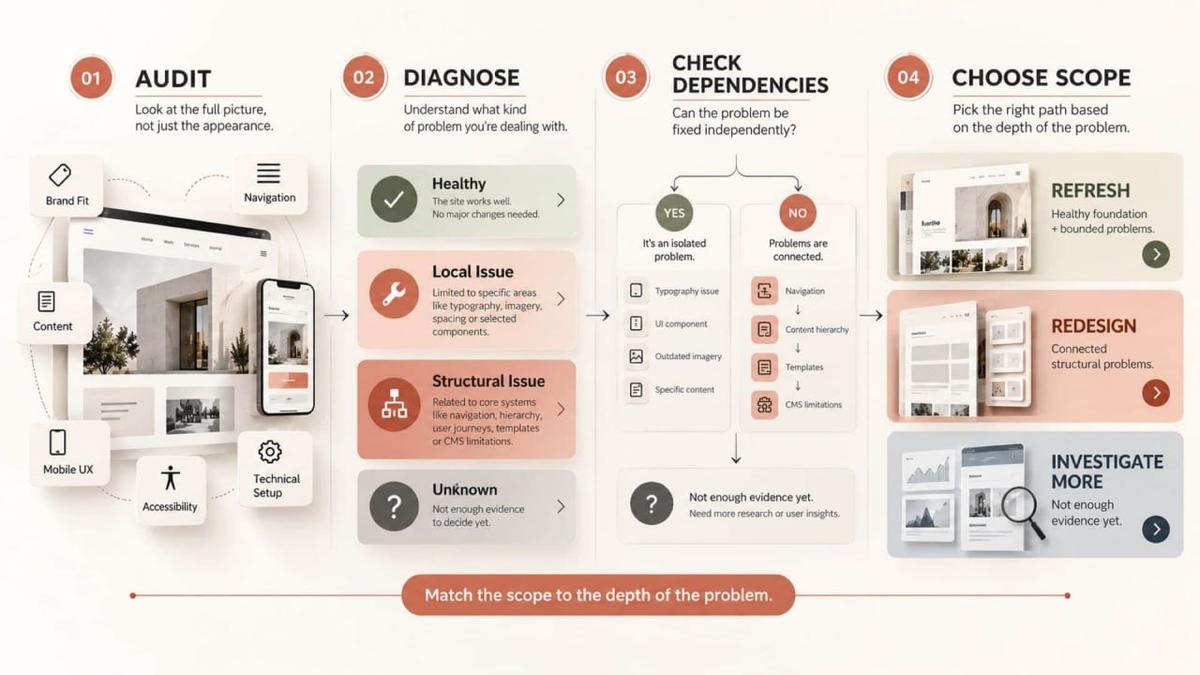
Build a Website Redesign Strategy Before Designing Screens
A website redesign strategy should begin with an audit, not a new visual direction.
Turn findings into priorities first. Review analytics where available, interview stakeholders, audit content, inspect technical limits, and observe users completing important tasks.
“Customers cannot find support content” is still an assumption until behavior, feedback, or testing supports it. Problems should also be written without prescribing solutions too early. “Mobile visitors miss the comparison path” leaves more room for investigation than “add a sticky button.”


Turn Findings Into Priorities
Separate verified problems from assumptions, then rank them by their effect on users, business goals, and technical risk.
The aim is to understand what actually needs to change before deciding how large the project should become.
Define Boundaries and Validation
Map each priority problem to the smallest credible change. Some issues may require content work; others may affect templates, navigation, information architecture, or technical implementation.
Return to the website redesign checklist and define what changes, what stays, and what still needs research. Validate important decisions through prototypes, content reviews, technical tests, or usability sessions.
Once those boundaries are clear, the website design and development process becomes the next conversation.
A redesign plan should also define what can realistically be evaluated after launch. Improvements in clarity or task completion can be tested, but redesign alone cannot guarantee traffic, conversions, revenue, engagement, or search performance.
Before You Decide
The website redesign vs. refresh decision is ultimately about the depth of change, not which option looks newer.
Classify each finding as cosmetic, content-related, experiential, structural, technical, or still unknown. Then look at dependencies.
A local interface issue may be fixed independently. Navigation tied to outdated content groups, unsuitable templates, and CMS limitations usually requires a broader response.
The final decision should lead to one of three outcomes:
- choose a refresh when the foundation is healthy and the problem is bounded;
- choose a redesign when structural issues are connected across the system;
- investigate further when the evidence is still incomplete.
The recommendation should explain what is failing, who is affected, why the current system can or cannot support the fix, and what should remain unchanged.
If the case depends mainly on words such as “dated,” “modern,” or “premium,” the diagnosis is not finished.
Final Thoughts
Choose the level of change that matches the problem.
A sound foundation deserves precise improvement. A failing system needs more than a new visual layer.
The value of website redesign vs. refresh lies in making that distinction before resources are committed, then defining a scope large enough to solve the verified problem and no larger.
Website Redesign or Refresh FAQ
What is the difference between a website refresh and redesign?
A website refresh improves selected visual, content, or usability elements while preserving the underlying structure. A redesign reconsiders systems such as navigation, hierarchy, templates, user journeys, or technical implementation.
When is a website refresh enough?
A refresh is usually enough when navigation, mobile behavior, content structure, templates, and technology still work well, but selected parts of the experience need improvement.
What are signs a website redesign may be needed?
Connected problems across navigation, content structure, mobile experience, accessibility, templates, or CMS limitations can indicate that the issue is structural rather than cosmetic.
What should brands do before deciding?
Audit the current site, identify dependencies, separate local issues from structural ones, and choose the smallest scope that can solve the verified problems.