Imagine a furniture brand planning a new website. Its team wants collection pages and material guides, but customers should also configure a sofa, save their choices, and request an accurate quotation. Those requirements belong to the same customer journey, yet they create very different design and development work. The website vs web application distinction helps identify that difference before an apparently simple project grows around unspoken assumptions.
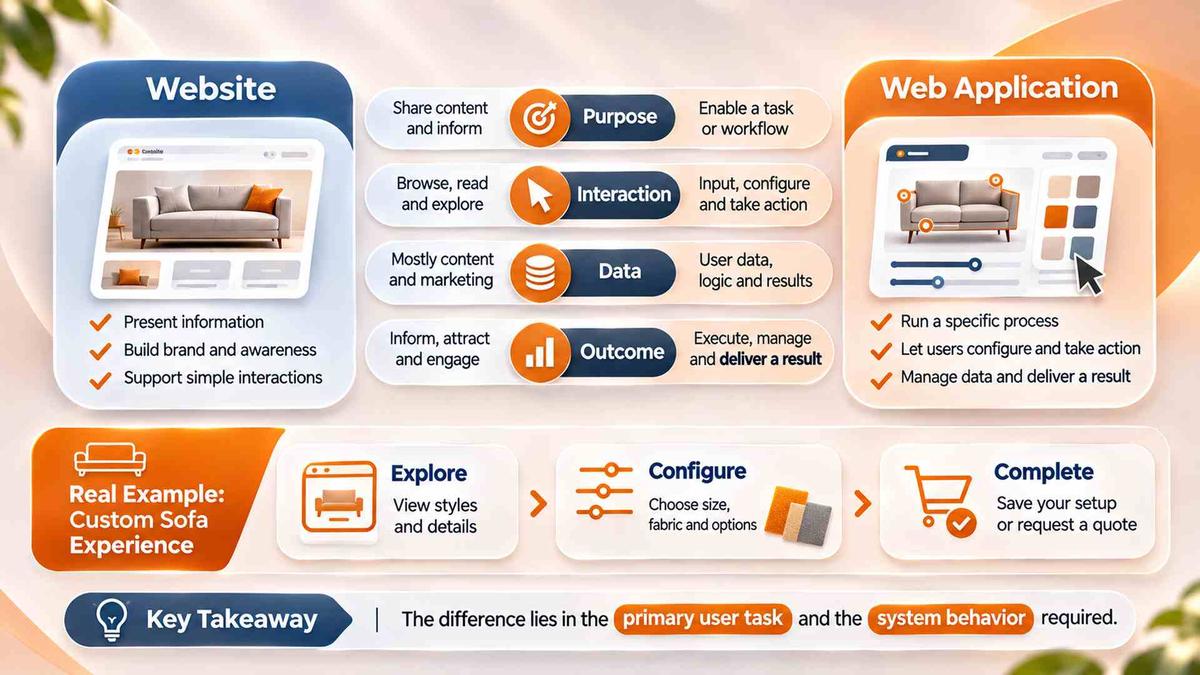
A website is a collection of connected web pages. A web application uses web technologies to let people perform tasks, such as editing a document or managing an order. It can form part of a website or occupy most of it. For planning purposes, the useful contrast is between an experience organized around information and one organized around completing work.
Website vs Web Application: Compare the Purpose First
The terms describe overlapping experiences rather than two mutually exclusive technical categories. Both can use databases, respond to user input, and display changing content. The practical website and web app differences concern what the user accomplishes and what the system must remember, calculate, or change in response. Appearance alone cannot establish those responsibilities.
A Website Helps Visitors Understand and Choose
For the furniture brand, collection photography, dimensions, care instructions, and delivery explanations help a visitor decide whether a sofa suits their room. Navigation and search make that information easier to find. A visitor can leave without creating a record or completing a transaction and still have received the intended value. An enquiry form supports the experience without redefining the entire project.
A Web Application Helps Users Complete Work
A sofa configurator must respond to selections. It might prevent an incompatible fabric and frame combination, calculate a price, and preserve a configuration for later review. These are application responsibilities because the result depends on inputs and rules. An anonymous calculator also qualifies as a browser application; accounts and dashboards are common possibilities, not defining requirements.

What Changes in Data, Interaction, and Testing?
In a website vs web application comparison, data becomes important when visitors can change records or depend on a calculated result. A public dimensions page presents product information. A saved configuration creates information associated with a particular selection. The team must establish whether that configuration is temporary, stored on one device, or recoverable through an account on another device.
Design the Changes Between Screens
Common web application features include saved progress, input checks, and access rules. For the furniture configurator, changing the sofa size may invalidate a selected cover. The interface must explain the change and help the customer recover. Designers should show what customers see while options load, when none are available, and after a selection is saved. A finished screen with sample data cannot explain those moments on its own.
Test Outcomes as Well as Presentation
Both experiences need responsive layouts, accessible controls, and dependable forms. Application testing must also follow the rules through different inputs and user roles. A quotation should use the correct options; an unavailable fabric should not remain selectable. If submission fails, the customer needs useful feedback and a safe way to continue. A visually correct button does not establish that the underlying operation succeeded.
Is an Ecommerce Store a Website or an Application?
An online store demonstrates why the website vs web application boundary is rarely absolute. Its editorial pages and product descriptions serve a website purpose. Cart management, checkout, and order tracking provide application behavior. Calling the whole experience an ecommerce website is normal, but its transaction flows still require the care associated with software.
For the furniture brand, a brochure catalogue and a working checkout are different commitments. Checkout introduces decisions about available combinations, prices, payment status, and order confirmation. A hosted commerce platform can supply much of that machinery. Choosing it does not mean every transaction rule or connection to the business is already resolved, nor does application behavior automatically require a custom build.
An embedded quotation tool creates a similar boundary. Establish where the product information comes from and what happens if the tool cannot load. If customers submit a configuration, does the sales team receive an enquiry or an approved order? The interface should make that distinction visible so an estimated price is not mistaken for a confirmed purchase.
What Web Application Examples Reveal About Scope
A browser document editor may need version recovery, an appointment portal must manage availability, and a product configurator must enforce compatible choices. Each supports a different task, with rules that a screenshot cannot explain. Compare these with a publication or portfolio, where visitors primarily need to find and understand information. Visual complexity is a poor guide to the work behind either experience.
For many brands, the website vs web application decision leads to a combined experience. These web application examples still need public explanations of what the service offers and who it suits. The furniture configurator also needs a clear route back to material and delivery information. Customers should not have to abandon a saved selection simply to answer a purchasing question.
The Flowtopia website redesign illustrates the explanatory side: its published case study describes reorganizing website content to communicate a trading platform's capabilities. A software product still needs clear public information. Improving that explanation is a distinct assignment from specifying the behavior of the platform itself, even when the two experiences share a visual identity.

Website vs Web Application Costs Depend on the Rules
Neither label determines the tools needed or the budget. A multilingual publishing website with extensive content migration can require more work than a small calculation tool. In the furniture example, supporting a limited set of compatible options differs substantially from keeping prices and availability aligned with another system. Estimate the actual rules, content, connections to other services, and testing involved.
Installation is also a separate requirement. A progressive web app can support installation and, when implemented, offline capabilities; ordinary web applications need neither. A furniture representative without internet access might need a catalogue stored on their device. If they also prepare orders offline, decide how those orders are sent later and what happens when a price or product changes before submission.
Maintenance should reflect the consequences of failure. An outdated care guide needs correction; a broken quotation rule can affect individual enquiries or orders. Identify who maintains product information, checks connected services, and resolves failures. Budget for these responsibilities using the actual website and web app differences in your project. The category alone does not explain the cost of keeping it dependable.
When evaluating design support, distinguish the deliverables involved. AALIX's creative expertise includes website design and UI/UX. For any studio, ask whether the agreed work covers page layouts, clickable prototypes, error and loading screens, development, or instructions for the team building the product. These deliverables answer different needs, and a polished prototype alone is not evidence that working software has been built.
Turn the Comparison Into a Clear Design Brief
A website vs web application brief should separate what visitors read from what the software decides. For the furniture brand, follow a customer from discovering a sofa to choosing options and receiving a quotation. Record where staff must approve a result or supply missing information. An attractive selection screen cannot resolve an undefined price rule or an unclear approval step.
- Information: which dimensions, materials, prices, and delivery explanations must customers understand?
- Behavior: which selections change the result, and what happens when an option becomes unavailable?
- Completion: what is saved or submitted, and how does the customer know the action succeeded?
Review proposed web application features against these answers. Saving a configuration earns its place if customers need to return to a considered purchase; an account may be unnecessary if a simpler recovery method works. For an existing site, a website content inventory helps identify explanations and assets that need attention before new functionality is commissioned.
The three web application examples above also suggest a useful review method: demonstrate a meaningful task with realistic inputs. For the sofa configurator, try an incompatible combination and revise a saved selection after a product changes. Agree what a correct outcome looks like. Check whether essential web application features behave as expected, rather than simply whether the screens look finished.
Conclusion
The website vs web application decision is ready for approval when the team can explain the result it is committing to support. If prices, compatible options, and the meaning of submission remain unsettled, the furniture configurator is not ready for construction. Resolve those decisions with the people who manage products and orders before approving screens that depend on them.
Turn website and web app differences into a release boundary: which tasks can customers complete reliably now, and which still require staff? Collection pages and an enquiry route may provide a useful first release while quotation rules are clarified. Add the configurator when its behavior is defined and maintainable, rather than presenting an unfinished transaction as a complete service.
Frequently Asked Questions
What is the main difference?
A website primarily presents information; a web application lets users perform tasks through software in a browser.
Can one project include both?
Yes. Public pages can explain products while a configurator or customer portal handles tasks.
Is an online store a web application?
It combines informational pages with application behavior, including carts, checkout, and order tracking.
Which option costs more?
Neither label determines cost. Content, business rules, integrations, testing, and maintenance shape the budget.
Do all web applications require accounts?
No. A calculator can work anonymously; accounts are useful when saved records require controlled access.